Viator Promo Codes + Cashback
Browse our team's hand-picked selection of offers for October 2026

I'm Tyesha, your Coupons.com editor, and I research and work directly with the Viator team to find the latest info on the best ways to save on the experiences on their platform. A surefire way to save on an experience you’re about to book is to download the app. During a recent test I ran, I downloaded the app and started searching for activities in different cities and almost immediately got a popup notification about an app-exclusive coupon for 15% off my next experience.
Viator is a platform for finding travel experiences, like tours, tastings, and day trips. You can browse through experiences for your next vacation in any continent, country, or city. On rare occasions, we see them promoting app-exclusive codes. Their most common offers are specific experiences discounted by the operators on their platform. We review which tours and excursions are discounted in popular destinations and share codes we find in the Viator app. To learn more about how we decide what to post, read our Editorial Guidelines.
Every booking you make on Viator is backed by their Lowest Price Guarantee. Let's say you booked a Chicago river tour for $100 and found the same cruise on the same date for $75 on a different website, or the price dropped on Viator. You can submit a claim and get $25 back without having to rebook your tour or deal with cancellation fees.
Your window for filing your claim starts from the time of your booking up to 48 hours after your trip starts.
To be eligible for a refund, you must meet these requirements:
Your original booking was purchased directly on Viator’s platform.
Your experience costs at least $20 (or currency equivalent).
The new, cheaper experience is for the same date and uses the same currency as your original booking.
The lower price must be a retail or prepaid rate available to the general public (not a special group rate or exclusive discount).
If your booking meets all these conditions, follow these steps to file your claim:
Gather your Viator Booking Number (or Itinerary Reference Number) and proof of the lower price
Email [email protected] with the documents, your name, and your home address
Wait for Viator to review your information and contact you
For approved claims, you’ll receive a refund for the difference between the prices within 48 hours. Viator doesn’t clarify whether your refund is returned to your original payment method or a site credit.
Each experience on Viator has its own specific cancellation policy.
On desktop, you can view your experience's cancellation policy by scrolling past the Overview and Itinerary sections. It’s situated between Additional Info and Traveler Photos. It’ll look like a short summary, but you can click “Show More” to get the full details.
In the app, scroll down past the Overview, photos, and reviews to find the Cancellation Policy section, then click “Read More” to get all the details.
The main policy types you'll encounter can be classified four ways:
Free Cancellation: You can cancel your reservation up to 24 hours before your scheduled activity and receive a full refund.
Non-Refundable: Your booking won’t be refunded under any circumstances. Double-check your bookings that fall under this category, as changes or cancellations won't be compensated.
Moderate Cancellation: You can cancel your reservation up to 4 days in advance for a full refund. However, cancellations within 3 days of your activity date are non-refundable.
Strict Cancellation: You can only get a full refund when you cancel 7 or more days before the activity. You will receive a 50% refund for cancellations within 3 to 6 days. Cancellations made less than 3 days in advance will not be refunded.
The cancel option will not appear for non-refundable bookings since they cannot be canceled or changed. When your travel plans aren't set in stone, look for experiences with free cancellation policies to protect your money.
Follow these steps:
Go to your profile
Click “Bookings”
Select "Cancel for free by..."
Follow the instructions
Receive a confirmation email with refund details
Your refund request will process within 48 hours. Once you're approved, it will take five to seven business days for it to appear on your statement, depending on your financial institution.
Browse Viator’s Nashville experiences for discounted rates on day trips to Memphis and Dollywood, e-bike tours, audio tours, outdoor mystery games, and classes. Eligible experiences are marked with "Special Offer" tag. Savings range from 5% to 80% off experiences. Prices are already marked down; no code required. Simply select your dates and book. Some experiences include free cancellation. Standard Viator terms and conditions apply. We last verified these offers’ details on October 1st, 2026.
Save 4% to 67% on select Chicago tours and experiences marked "Special Offer." Eligible activities include architecture boat tours, segway and bike tours, private guided tours, self-guided tours, and photo shoots. For example, 4% off lakefront bike tours, 20% off private walking tours, and 67% off self-guided tours. Prices as marked; no code needed. Standard Viator terms and conditions apply.
How does Viator cashback work?
Browse these offers for 10% to 67% off Seattle-area tours and experiences for October 2026. Eligible experiences marked "Special Offer"; includes walking tours, food tours, ferry rides, and scavenger hunts.
Explore up to 60% off select Las Vegas tours at Viator, including sightseeing trips, shows, excursions, and local experiences. Offer applies to qualifying bookings only, and some tours, dates, or activities may be excluded. This offer may change or end without notice, and all changes are up to Viator’s discretion.
Browse Viator’s "Special Offer" discounted rates on select Cancún tours and excursions for 2026. Savings range from 5% to 50% off experiences. For example, a Cancun speedboat and snorkel tour is $56 (marked down from $59 for 5% off), an All-Inclusive Isla Mujeres Catamaran is $62 (marked down from $83 for 25% off), and a city tour is $12 (marked down from $24 for 50% off). Prices are already marked down; no code required. Simply select your dates and book. Most experiences include free cancellation. Some tours are priced per group rather than per person. Standard Viator terms and conditions apply. We last verified these offers’ details on September 21st, 2026.
Save 5% to 35% on select Rome tours and excursions for 2026 travel with Viator's Special Offer deals. Eligible experiences include sightseeing tours and food and wine tastings. For example:
Prices are shown as marked; savings apply only to tours labeled "Special Offer." Some prices vary by group size and traveler age. Standard Viator terms and conditions apply. We last verified these offer details on September 17th, 2026.
Browse Viator’s Miami experiences for discounted rates on boat tours, cruises, helicopter and segway tours, nightlife experiences, and airport and cruise port transfers. Eligible experiences are marked with "Special Offer" tag. Savings range from 4% to 34% off experiences. Prices are already marked down; no code required. Simply select your dates and book. Some experiences include free cancellation. Standard Viator terms and conditions apply. We last verified these offers’ details on October 1st, 2026.
Find Barcelona tours and excursions discounted by 5% to 33%. Examples include tours of Sagrada Familia, the Gothic Quarter, Gaudi highlights, and monasteries. Other excursions include food, tours, dance lessons, hikes, and walking tours. For example, we saw a Barcelona dance lesson for 5% off $65, a food tour that was 16% off $64, and a social event experience that was 33% off $24. Price as marked; to redeem, select date, and number of travelers, then book online. Expiration dates vary by tour. Standard Viator terms and conditions apply. We last verified these offer details on September 3rd, 2026.
Save 5% to 20% on select 2026 tours and excursions in Paris with Viator's Special Offer deals. Eligible experiences include sightseeing tours, Seine River cruises, food and wine tastings, day trips, and photo sessions. For example:
Prices are shown as marked at booking; savings apply only to tours labeled "Special Offer." Many prices vary by group size and traveler age. Standard Viator terms and conditions apply. We last verified these offer details on September 17th, 2026.
Select experiences in Viator's North America Autumn/Fall list for up to 15% off. For example, the New York Fall Foliage Helicopter Tour from New Jersey, regularly priced at $441, is discounted to $374. Offer has no set expiration date and will be updated when no longer active.
Browse Viator's Chicago tours and excursions and save 5% to 33% (or about $1 to $41 per booking) on select activities for September 2026. Prices are marked down as shown; no code required. For example, save $41 on the Private Chicago Guided Tour with Hotel Pickup (now $788, down from $829, about 5% off); save $15 on the Make Fresh Pasta With a Local Chef experience (now $60, down from $75, which is 20% off); and save $2 on the Chicago Murder Mystery Self-Guided Detective Walk (now $4, down from $6, about 33% off). Prices vary by group size on some activities, and most bookings include free cancellation. Standard Viator terms and conditions apply. We last verified these details on September 14th, 2026.
Browse discounted rates on select tours in Las Vegas for 2026. Savings range from 5% to 20%. Eligible tours and excursions are marked with a "Special Offer" tag and include kayak tours, guided hikes, national park trips, and walking tours. For example, save $20 on an Emerald Cave kayak tour. Prices are already marked down; no code required. Simply select your dates and book. Most experiences include free cancellation. Some prices may be additionally discounted based on age of traveler. Standard Viator terms and conditions apply. We last verified these offers’ details on September 25st, 2026.
Save 4% to 26% on select Oahu tours and excursions. Prices marked as shown; no code required. Eligible experiences include day tours, luaus, snorkel tours, party cruises, and more. For example, the Oahu Ultimate Circle Island day tour original cost was $135, but is now $100 or 26% off. Most listings include free cancellation. Subject to availability. Standard Viator terms and conditions apply. We last verified these offer details on September 10th, 2026.
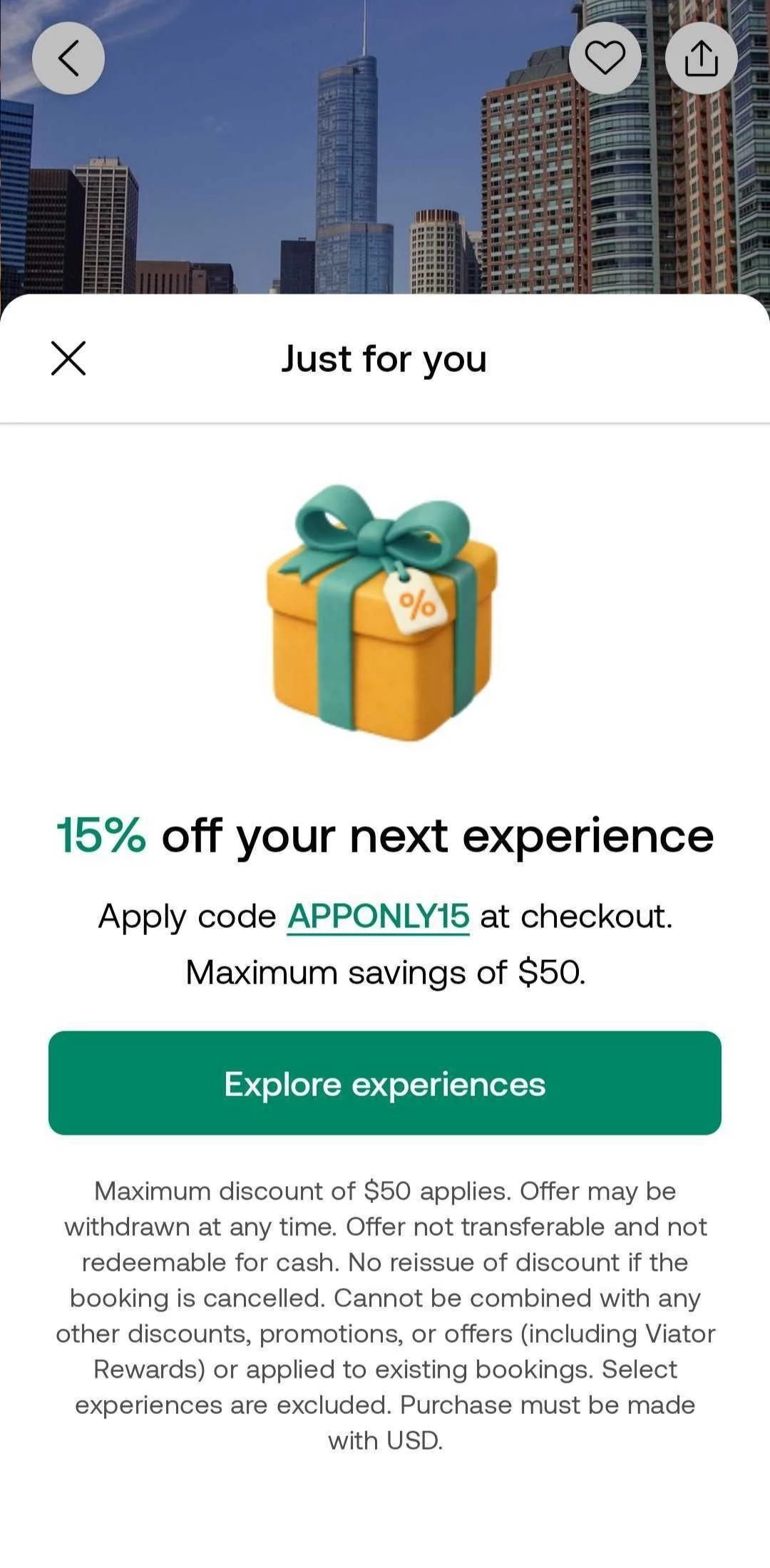
Download the app before you book your next experience to get app-exclusive coupon codes. On a recent visit to the app in June 2026, we were researching deals on experiences in Chicago and got a popup for an in-app-only coupon code for a 15% discount on our next experience.
The popup showed the discount, the terms, and a button labeled “Explore Experiences.” After clicking the button, we could see which experiences were eligible for the discount. We tested whether the code worked on the website, and entering it on the site returned an error message, while in the app it worked perfectly.
To get the Viator app, download it for free from the App Store or Google Play Store.
Viator Rewards is useful to keep track of if you’re a repeat Viator user. You are automatically enrolled once you create a free Viator account and sign in. As a Rewards program member, you'll earn money back on your travel bookings. Book an experience through Viator, and 24 hours after it starts, you'll receive a site credit in your account to use toward your next one.
Not every experience is eligible for earning rewards. Here are some exclusions:
Experiences booked through a travel agent, partner site, or affiliate site or link
Bookings made in a different currency than your existing rewards balance
Bookings made using a promo code at checkout
When earning rewards, it’s important to know:
You only earn rewards when you book directly through Viator’s website or app.
You’ll see how much you’ll earn in rewards during the booking process before you confirm.
Rewards are tied to your booking date, not your travel date. So, you can book a trip for next year using rewards that expire this month.
Rewards expire 180 days after becoming available.
When redeeming rewards, you should know:
Your available rewards automatically apply at checkout. However, you can choose not to use them by switching them off.
You can never pay 100% of a booking with rewards. There has to be a minimum remaining payment amount of at least $1 after rewards.
You can't redeem rewards and use a promo code at the same time.
Since you can’t combine rewards with a promo code, you should compare the promo code savings versus your available rewards balance before booking.
For example, if you have a $5 reward balance and a 15% off promo code, a $100 tour would result in $95 using your rewards, but only $85 using the promo code, making the promo code the better option. On the other hand, with a $30 rewards balance, using that would save you more than the $15 you’d save with the promo code on the same tour.
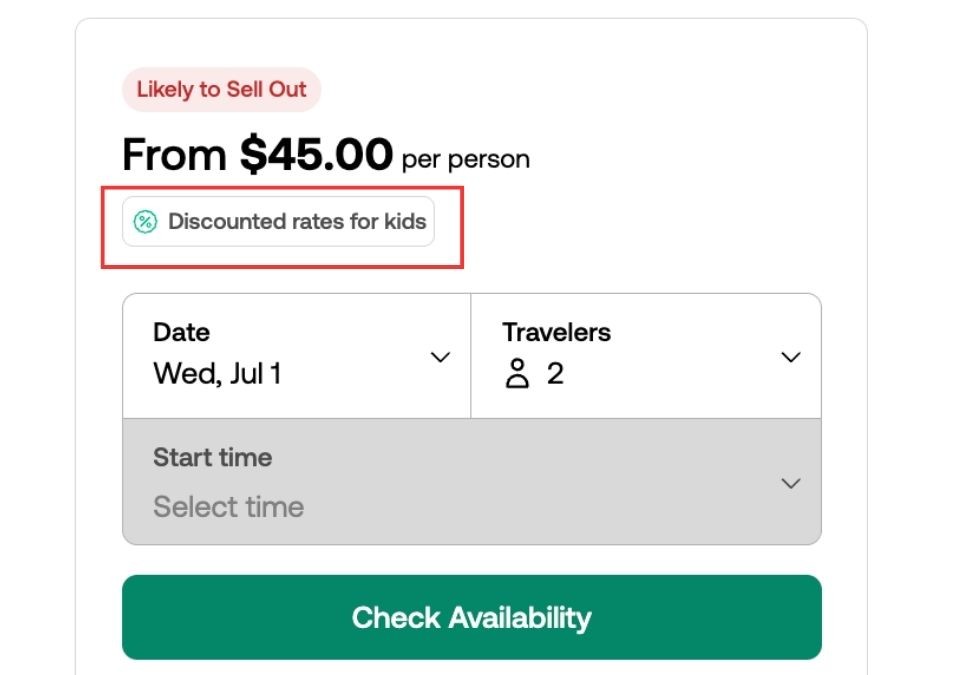
Many experiences give discounted rates for children. Based on the bookings we’ve seen in 2026, these discounts typically range from 10% to 65% off adult prices.
You won’t find these discounts on every tour or activity:
On desktop, if they’re available, you’ll see a green "Discounted rates for children" tag placed directly under the price at the top of the experience’s page. Click it, and a pop-up will show you what discounts the operator is offering for different age brackets.
In the app, there is no way to see that rates are discounted until you’re adding travelers to your booking and can plainly see the price difference between adding adults and children.
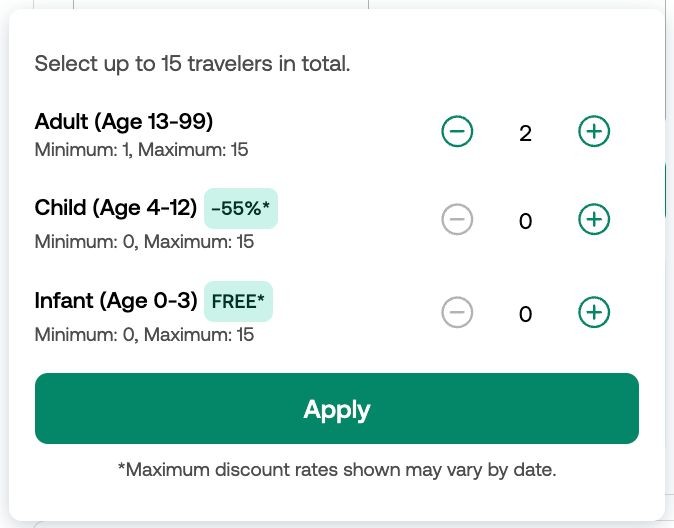
There isn’t a sitewide policy for children's prices, so every operator approaches it on their own terms. Age categories and cutoffs will vary by experience. Some tours classify 13-15-year-olds as either children or adults depending on the operator.
As of 2026, we’ve seen these age breakdowns most often:
Infants (ages 0-2) often tour for free
Children (ages 3-15) receive percentage discounts
Adult rates typically begin around ages 13-16
For example, when we looked at some bus tours, children aged 3-12 received up to 65% off, while some museum tours gave 25% off for ages 5-15. A Chicago architecture river cruise offered discounted rates for children, where travelers aged 13 and up were charged adult rates, ages 3-12 were charged the child rate of 48% off, and infants aged two and under could attend for free.
Using a Viator promo code is a little different between the app and the website.
On desktop, you can follow these steps.
Choose the experience you want to book.
Select the date and number of travelers.
Pick your time slot, then click “Book Now.”
On the Checkout page, locate your booking summary on the right.
Beneath your summary, you will see a button labeled "Enter Promo Code".
Click the button to open the text box.
Paste your promo code into the box.
Click the "Apply" button.
In the app, follow these steps:
Choose the experience you want to book.
Tap “Check Availability.”
On the next screen, select your date, add the number of travelers, and choose a time slot.
Once you’re done, tap “Select” to go to the Checkout page.
Beneath your booking details, find the "Enter Promo Code" button.
Tap it to reveal the text box.
Enter your promo code and tap “Apply.”
If the promo code successfully applies, you’ll see a note for how much money you saved. If it doesn’t work, you’ll get a red error message stating that your promo code may be expired or invalid.
Viator does not permit stacking multiple coupons on a single purchase. However, they do allow you to use a coupon on experiences with discounted rates.
You can write a review for your approved transactions.













.jpg)










